TL;DR: A mid-year security review helps industrial property managers find out whether their cameras, access control, and service plan are actually reducing risk across the portfolio. If your systems only record incidents after the damage is done, you may still be exposed to liability, tenant disputes, after-hours calls, and operational headaches. This quick commercial security system audit gives you a 5-minute version of Hoosier Security’s full Industrial Property Portfolio Risk Scorecard so you can see where your current system is helping and where it is quietly creating risk.Why Should Industrial Property Managers Do a Mid-Year Security Review?
Mid-year is the right time to ask a blunt question:
Is your security system helping you resolve problems, or is it just recording them?
Most industrial properties have cameras. Many have access control. Some have alarms, gates, cloud dashboards, or video platforms across multiple sites. That does not automatically mean the system is reducing risk.
A camera that records an incident but cannot be searched quickly is not solving the problem. An access system that creates confusion during tenant turnover is not reducing your workload. A platform that looks fine until a camera goes offline before an audit is not protecting your portfolio.
For industrial property managers, the risk is bigger than one broken device. You are responsible for multiple buildings, multiple tenants, shared spaces, vendors, after-hours activity, and owner expectations. When something happens, the question is rarely, “Do we have cameras?”
The real question is: Can you prove what happened, respond quickly, and trust that the system worked when it mattered?
That is where a commercial security system audit becomes valuable.
What Is a Commercial Security System Audit?
A commercial security system audit is a structured review of how well your cameras, access control, alarms, monitoring, and service support are performing in real life.
It is not just a hardware checklist.
A useful audit looks at whether your security system can help you:
- Answer incident questions quickly
- Pull usable video without delays
- Provide documentation to tenants, owners, or insurance
- Confirm cameras and devices are online
- Identify service issues before they become emergencies
- Reduce after-hours calls and unnecessary site visits
- Maintain visibility across multiple properties
For industrial property managers, this matters because security problems rarely stay neatly contained. A damaged gate, missing footage, unauthorized access event, or offline camera can turn into a tenant complaint, insurance dispute, owner question, or liability concern.
The goal is not simply to have a system.
The goal is to have a system that works when someone needs answers.
Are Your Cameras Working, or Are They Just There?
One of the most common questions property managers ask during a security system health check is simple: Are my cameras working?
But “working” needs to mean more than a camera is mounted on the building.
A camera is only useful if it is online, recording, positioned correctly, retaining footage, and easy to search when an incident happens. Across an industrial property portfolio, that becomes harder to manage when every building has a different system, different login, different vendor, or different process for retrieving video.
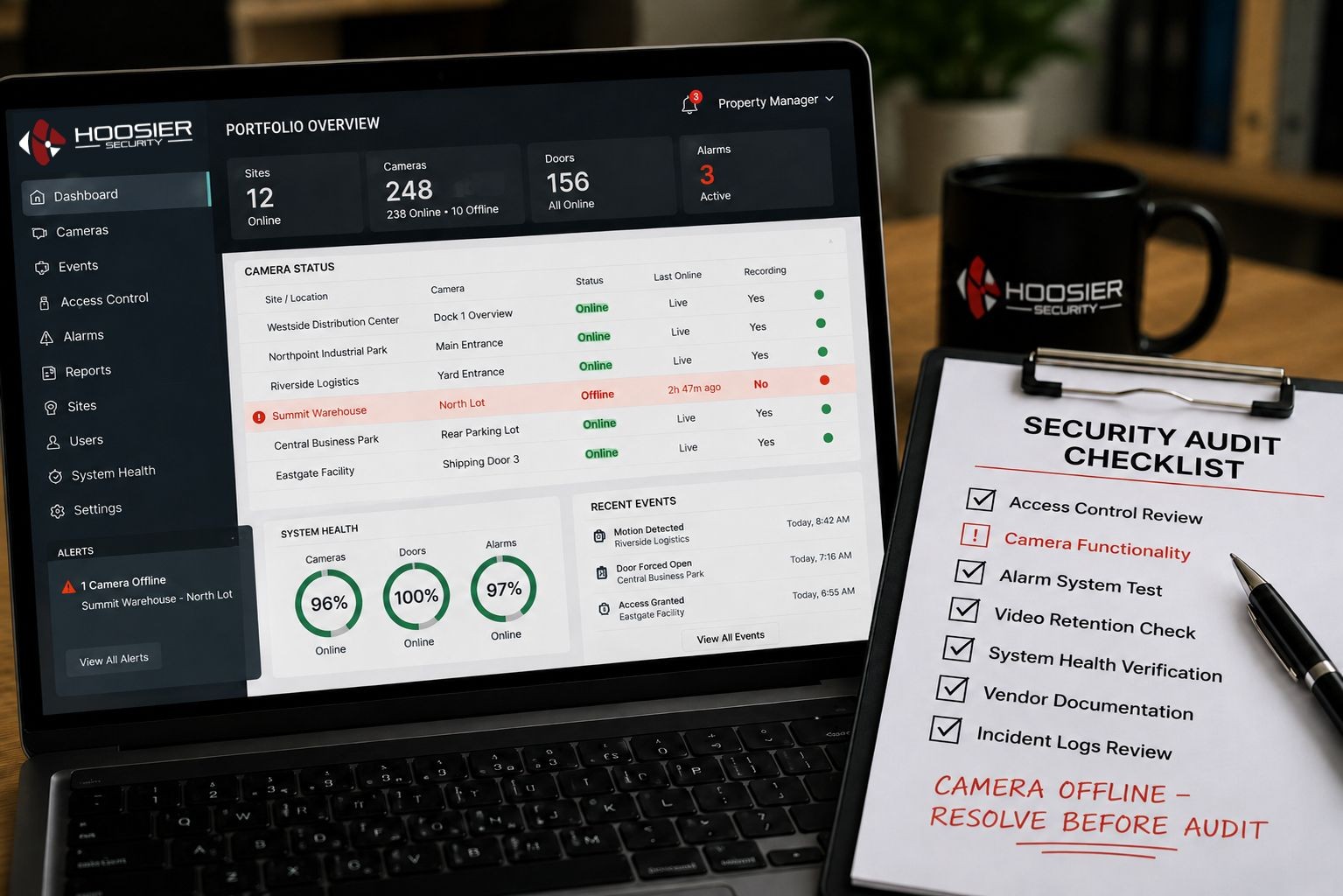
This is where cloud-based platforms can help. Solutions like Verkada Command, Avigilon Alta Cloud, and Eagle Eye Networks give teams better visibility into system status, camera health, and video access across locations.
The technology matters, but the bigger issue is the outcome.
When a tenant calls and asks what happened, can you answer in minutes?
When ownership asks for documentation, can you provide it without chasing people?
When a camera goes offline, do you know before the footage is needed?
That is the difference between recording risk and reducing it.
The 5-Minute Mid-Year Facility Security Review
Use these six questions as a quick mid-year facility security review. They are adapted from Hoosier Security’s Industrial Property Portfolio Risk Scorecard, specifically the categories focused on “What Happened?” moments and systems that actually work.
Score yourself honestly:
Yes = 2 points
Partial = 1 point
No = 0 points
1. Can you answer “what happened?” within minutes, not hours?
When an incident occurs, time matters. A slow search process creates frustration for tenants, owners, insurance contacts, and internal teams.
If your team has to log into multiple systems, call a tenant, contact a vendor, or wait for someone onsite to pull footage, your system is not reducing enough risk. It may be creating more work at the exact moment you need clarity.
A strong system should help you find relevant footage quickly, verify the situation, and respond with confidence.
2. Are the right people notified without you coordinating the response?
Property managers should not have to act as the communication hub for every security event.
When an alarm triggers, access issue occurs, or after-hours incident happens, the right people need to know without a long chain of manual texts, calls, and emails. That may include internal staff, tenants, monitoring partners, law enforcement, or your security provider depending on the situation.
Good security operations reduce coordination burden. Poor systems make you the default dispatcher.
3. Can you easily provide proof to tenants, owners, or insurance?
Footage is not the same as proof if it is hard to find, incomplete, unclear, or unavailable.
Industrial property managers often need documentation for damage claims, theft, unauthorized access, tenant disputes, insurance conversations, or owner reporting. Your system should help you provide a clear record of what happened.
That includes video, access logs, event history, timestamps, and service documentation when needed.
4. Do your systems work without constant oversight or troubleshooting?
A security system that requires constant babysitting is not an asset. It is another operational burden.
Cameras going offline, access panels failing, gates not reporting properly, and service issues sitting unresolved all create hidden exposure. The risk often stays invisible until someone needs the system and discovers it did not work.
A proper security system health check should review uptime, device status, recurring issues, service history, and whether the system is reliable across every property.
5. Are problems fixed before you even know about them?
This is where service matters.
A system can have great technology and still fail if no one is actively keeping it healthy. Hoosier Security’s Just Fix It, or JFI, service agreement is designed to reduce that burden by proactively keeping systems online and operational.
That means fewer surprise repair bills, fewer unresolved issues, and less time spent chasing offline cameras the week before an audit, renewal, tenant meeting, or incident review.
The mid-year answer you want is simple:
Yes, the system is working. Yes, the issue was already handled. Yes, we can trust it.
6. Can you trust your system to perform when something happens?
This is the question that matters most.
You do not find out whether your security system is reliable during a sales demo. You find out when something happens after hours, when a tenant is upset, when ownership wants answers, or when insurance asks for documentation.
Trust comes from consistency.
Your system should be actively monitored, maintained, and supported so you are not left wondering whether the cameras were online, whether footage was saved, or whether the access logs are available.
How Do You Score Your Mid-Year Security Review?
Add up your score from the six questions above.
0–4 Points: High Risk
Your system may be recording some activity, but it is not giving you the visibility, reliability, or documentation you need. This creates unnecessary exposure across your portfolio.
5–8 Points: Gaps Exist
You have security in place, but key weaknesses remain. These gaps often show up during after-hours incidents, tenant disputes, maintenance issues, or owner requests.
9–11 Points: Strong, But Not Fully Protected
Your system is helping, but there may still be reliability, service, or response issues that need attention. This is the right time to tighten the process before the next incident exposes the gap.
12 Points: Portfolio-Ready
Your systems are doing more than recording. They are helping your team verify activity, respond faster, document incidents, and reduce management burden across your properties.
For the full review, Hoosier Security offers a 21-question Industrial Property Portfolio Risk Scorecard that looks at after-hours issues, tenant access, portfolio visibility, liability, system reliability, and vendor management.
What Should a Security System Health Check Include?
A strong security system health check should review both technology and process.
At minimum, industrial property managers should evaluate:
- Camera uptime and offline device history
- Video retention settings
- Footage search speed
- Access control logs
- Tenant and vendor access processes
- Gate and door performance
- Alarm response workflows
- Monitoring coverage
- Service history
- Open repair issues
- Vendor accountability
- Documentation availability
- Multi-site dashboard visibility
This is where platforms like Verkada Command, Avigilon Alta Cloud, and Eagle Eye can be valuable when they are designed and supported correctly. Cloud visibility can make it easier to manage cameras and access across multiple sites, but the platform alone is not the full solution.
The real value comes from pairing the right system with a partner who keeps it working.
How Hoosier Helps Property Managers Reduce Portfolio Risk
Hoosier Security works with industrial property managers who need protection across more than one building, tenant, or access point.
That usually means the goal is not “more equipment.”
The goal is:
- One system across your entire portfolio, not one per building
- Easier access management during tenant and vendor changes
- Faster answers when something happens
- Fewer after-hours calls
- Better documentation for disputes and insurance
- Proactive service that keeps systems running
- Less vendor chaos across cameras, access control, intrusion, and fire
With Hoosier’s JFI service agreement, the service model is built around finding and fixing issues before they become your problem. That matters because a security system is only valuable when it is online, accessible, and ready during the moment you need it.
You should not have to discover an offline camera during an incident review.
You should know your system is being maintained before that moment ever happens.
The Camera Was There, But the Answer Wasn’t
Picture a property manager responsible for several industrial buildings. A tenant reports damage near a shared loading area. Ownership wants to know what happened. The tenant wants accountability. Insurance wants documentation.
The building has cameras, but the footage is hard to find. One camera angle is offline. Another camera has limited retention. Access records are stored separately. The property manager ends up calling the tenant, the vendor, and the security provider just to piece together the timeline.
The issue is not that the property had no security.
The issue is that the system was not built to answer the question quickly.
Now compare that to a portfolio with centralized camera visibility, searchable footage, accessible event history, and proactive system health monitoring. The property manager can verify what happened, provide documentation, and move the issue forward without becoming the investigator, dispatcher, and technician.
That is the difference between a system that records and a system that resolves.
What Should You Do After a Mid-Year Facility Security Review?
After your quick review, there are three practical next steps.
1. Identify the weakest category
Look for the area where you answered “No” or “Partial” most often. For many industrial property managers, the weakest areas are footage retrieval, offline camera awareness, tenant access changes, and vendor follow-up.
2. Review your service model
Technology gets attention, but service is often the deciding factor. Ask whether your provider is proactive or whether you have to chase every issue yourself.
A strong system should not depend on you noticing the problem first.
3. Complete the full Portfolio Risk Scorecard
The six questions above are the short version. The full Industrial Property Portfolio Risk Scorecard includes 21 questions across seven categories, giving you a clearer picture of where your portfolio is protected and where risk is still hiding.
FAQ: Commercial Security System Audits for Industrial Property Managers
What is a commercial security system audit?
A commercial security system audit is a review of how well your cameras, access control, alarms, monitoring, and service support are working. It helps identify gaps in visibility, reliability, response, documentation, and system health before those gaps create bigger problems.
How often should industrial property managers review their security systems?
Industrial property managers should review their systems at least twice a year, with a mid-year facility security review and an annual planning review. A mid-year review helps catch issues before year-end reporting, renewals, budget planning, insurance reviews, or major tenant changes.
Are my cameras working if they are recording video?
Not necessarily. A camera may be recording but still fail to reduce risk if it is hard to search, pointed at the wrong area, offline when needed, missing retention, or disconnected from the rest of your security process. Working means the camera is online, usable, searchable, and supported.
What is a security system health check?
A security system health check reviews whether your cameras, access control devices, gates, alarms, and related systems are online and performing correctly. It should also include service history, recurring issues, video retention, access logs, and response workflows.
How does JFI help with system reliability?
Hoosier Security’s Just Fix It service agreement helps keep systems operational by proactively addressing issues instead of waiting for customers to discover problems. For property managers, that means less time chasing offline cameras, fewer surprise repairs, and more confidence that systems will work when an incident occurs.
What is the difference between recording an incident and reducing risk?
Recording an incident means your system captured something after it happened. Reducing risk means your system helps you detect issues earlier, notify the right people, retrieve proof quickly, support claims or disputes, and keep devices working without constant oversight.
Next Step: Download the Full Industrial Property Portfolio Risk Scorecard
This 5-minute review gives you a quick snapshot, but it is not the full picture.
Download Hoosier Security’s Industrial Property Portfolio Risk Scorecard to complete the full 21-question review across after-hours activity, tenant access, portfolio visibility, liability, system reliability, and vendor management.
Then schedule a portfolio walkthrough or Experience Center visit with Hoosier Security. We will help you evaluate your current systems, identify risk across your properties, and build a plan that works across your entire portfolio.
Security that works across every property you manage.