TL;DR Traditional DVR scrubbing can turn a simple incident review into a four-hour search. AI video search for commercial properties helps teams find footage fast by searching for people, vehicles, colors, locations, and activity using modern video analytics.

For property managers, facilities teams, and security leaders, the real value is not just that the feature exists. The value comes when the system is configured around your actual properties, tenants, entrances, parking lots, dock areas, and after-hours risks.
Why does investigation time matter for commercial properties?
Here is the time math.
A tenant reports suspicious activity at 2 a.m. A vehicle was near the dock. Someone may have entered a shared hallway. Nobody knows exactly which camera caught it, what time it happened, or whether the person left the property.
With a traditional DVR or outdated video system, your team may spend four hours scrubbing through clips camera by camera. That means checking the parking lot, then the dock, then the front entrance, then the side door, then the shared hallway. By the time someone finds the right footage, the tenant is frustrated, your maintenance team has lost half a day, and the answer is still not packaged clearly.
With intelligent video search, that same search can take 30 seconds.
That is the difference between clip hunting and answering the question property managers actually care about: Can you answer “what happened?” within minutes, not hours?
For industrial property managers, multi-tenant commercial buildings, logistics facilities, and warehouse portfolios, this matters because incidents rarely arrive with perfect details. Tenants do not usually know the exact timestamp. Police reports are not always immediate. Vendors may not remember which door they used. The security system has to help your team narrow the search quickly.
What is AI video search in commercial security?
AI video search is a feature within modern video platforms that helps users search recorded video based on people, vehicles, appearance, location, movement, or other searchable attributes.
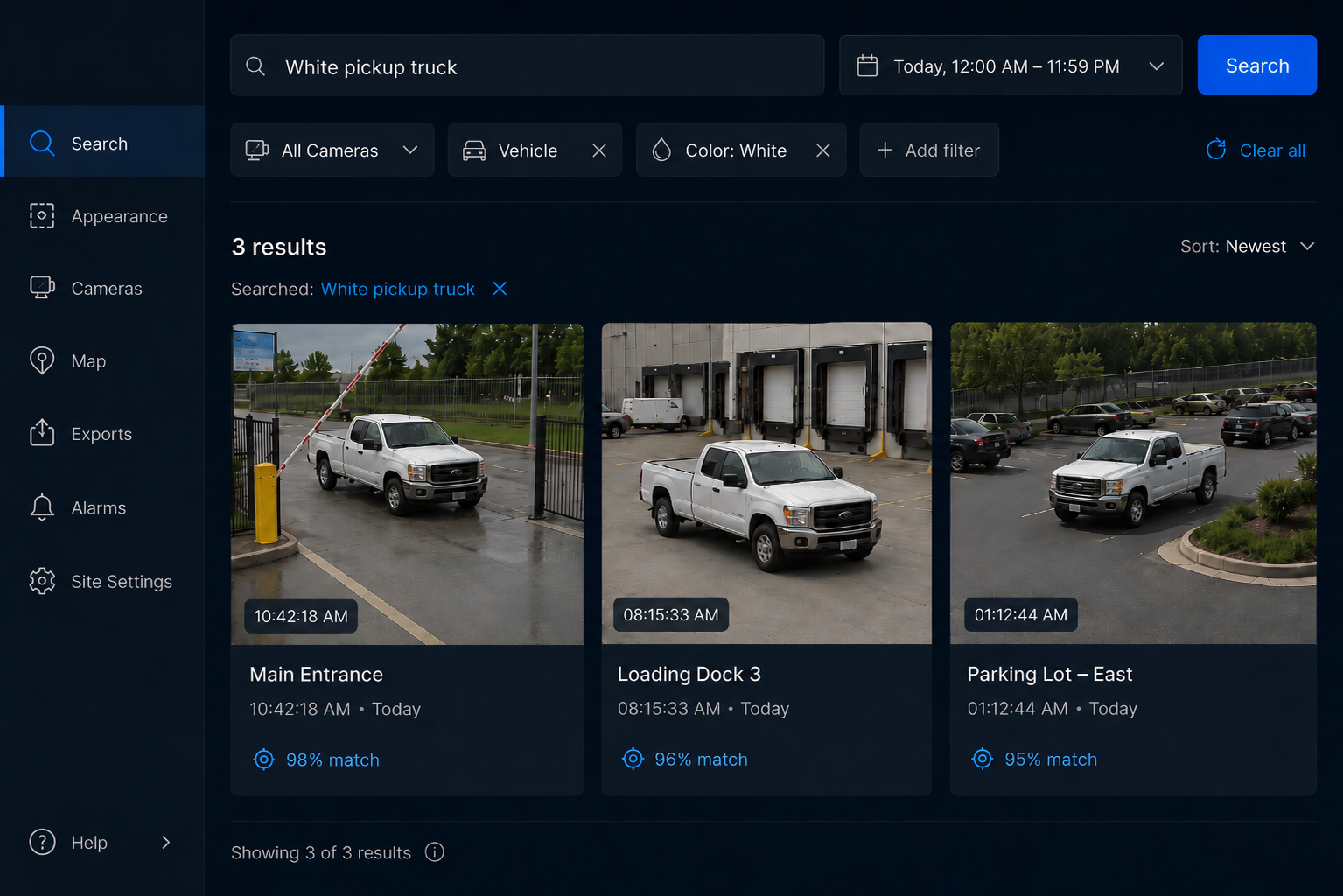
Instead of opening a timeline and dragging through hours of footage, your team can search more naturally. Depending on the platform, a user may search for a person in a red jacket, a white pickup truck, a delivery vehicle near a loading dock, or a person moving through a restricted hallway after hours.
Platforms like Verkada Command, Avigilon Alta Appearance Search, and Avigilon Unity Video or ACC environments are built to reduce the manual work involved in investigations. The exact workflow depends on the system, camera coverage, licensing, analytics capabilities, and configuration, but the purpose is the same: help your team find the right footage faster.
That does not mean every AI search tool works perfectly out of the box.
A demo can look impressive in a controlled environment. A real commercial property is different. Your property has glare, dock doors, semi traffic, tenant entrances, shared corridors, weather, poor lighting in certain areas, and people moving in patterns that are unique to your site.
That is why configuration matters.
How does intelligent video search help property managers find footage fast?
Intelligent video search helps property managers reduce investigation time by narrowing the search based on what is known.
Instead of asking, “Who has time to review every camera from midnight to 4 a.m.?” your team can start with practical questions:
- Was there a person near the dock after 2 a.m.?
- Did a white van enter the property overnight?
- Did someone walk through the shared tenant hallway?
- Was there activity near the dumpster enclosure?
- Did a vehicle stop near the fence line?
- Did a person move from the parking lot to the side entrance?
- Was a delivery driver on-site outside the expected window?
That is the real advantage of AI video search commercial property teams can use. It turns a vague complaint into a focused search.
For property management, this is especially valuable because the person investigating the issue is often not a full-time security operator. It may be a property manager, operations coordinator, maintenance supervisor, or regional leader who needs a clear answer quickly.
A modern system should help that person find footage without becoming a video forensic expert.
What does this look like in a real tenant complaint?
Picture a multi-tenant industrial building.
At 2 a.m., a tenant sends a complaint about activity near their suite entrance. They believe someone was walking around the shared loading area. They also mention a light-colored truck, but they are not sure when it arrived or whether it was connected.
By 8 a.m., the property manager has the complaint.
In an old DVR workflow, someone starts pulling clips from several cameras. They check the front entrance. Nothing. They check the dock camera. Too much activity. They check the shared hallway. Still unclear. The timeline gets messy, and the morning disappears.
With a properly configured modern video platform, the investigation starts differently.
Search query one: light-colored truck near the loading area between midnight and 3 a.m.
Search query two: person near tenant suite hallway after 2 a.m.
Within minutes, the property manager can see whether the truck entered the property, whether a person approached the suite area, and whether the complaint points to a real issue or a misunderstanding. Before lunch, the tenant has an answer, the property manager has supporting footage, and the team knows whether follow-up action is needed.
That is the business case. Not “AI is cool.” Not “analytics are available.” The business case is less wasted time, faster answers, better documentation, and fewer unresolved tenant complaints.
Why is configuration more important than the feature list?
The biggest mistake is assuming video analytics work just because the platform includes them.
A feature can exist and still fail in your environment.
For example, intelligent video search may struggle when camera placement is poor, lighting is inconsistent, views are blocked, or the analytics are not aligned with the actual use case. A camera aimed at the wrong angle may technically be recording, but it will not help much when you need to identify where a person walked or which vehicle entered the lot.
Hoosier Security helps close that gap by configuring analytics around the property’s real-world risks, not a generic demo reel.
That includes reviewing:
- Which entrances matter most
- Which cameras need people analytics, vehicle analytics, or both
- Where tenant complaints usually happen
- Which areas have after-hours activity
- Which loading zones, lots, and shared spaces need faster searchability
- How long footage should be retained
- Who needs access to search footage
- How video search connects to access control or alarms
- Whether cloud or on-premise video management is the better fit
This is the difference between “the platform can do it” and “your team can actually use it when something happens.”
Which platforms support faster video investigations?
Several modern video platforms can help property managers and security teams reduce investigation time. The right choice depends on your portfolio, IT requirements, existing cameras, access control environment, and preferred management model.
Verkada Command
Verkada Command is a cloud-managed platform that supports AI-powered search using natural language and image-based search capabilities for people and vehicles. For a property management team, that can mean searching more quickly across cameras and locations instead of manually reviewing every clip.
This can be useful for multi-site commercial properties where a regional manager or centralized team needs visibility across multiple buildings without logging into separate systems for every property.
Avigilon Alta Appearance Search
Avigilon Alta is a cloud-based security platform that brings together video, access control, analytics, and remote management. Avigilon Alta Appearance Search can support faster searches for people and vehicles, helping teams investigate incidents with less manual review.
This can be a strong fit for property managers who want cloud-based management, remote access, and easier multi-site visibility.
Avigilon Unity Video and ACC environments
Avigilon Unity Video and Avigilon Control Center environments are often relevant for organizations that need a more on-premise or hybrid video management approach. Avigilon Appearance Search and related AI analytics can help teams locate people, vehicles, and objects of interest across recorded video.
This can be useful for larger facilities, critical sites, or organizations with specific IT, storage, or infrastructure requirements.
The platform matters, but the deployment matters more. Camera views, analytics setup, permissions, retention, and user training are what turn video analytics into usable investigation workflows.
What should property managers look for in an intelligent video search system?
Before investing in a video platform, property managers should focus on operational outcomes. The goal is not to buy the longest feature list. The goal is to answer “what happened?” faster and with less friction.
Use this checklist when evaluating AI video search for commercial properties:
- Search speed
Can your team find relevant footage in minutes, or are they still dragging through a timeline? - People and vehicle search
Can the system help locate people and vehicles based on available visual details? - Multi-camera search
Can searches run across multiple cameras or sites, or does each camera need to be reviewed separately? - Time and location filters
Can users narrow searches by property, camera group, entrance, parking area, hallway, or time window? - Access permissions
Can property managers, regional leaders, and approved tenant contacts have the right level of access without overexposing the system? - Export and sharing
Can your team quickly package clips for tenants, law enforcement, insurance claims, or internal documentation? - System health visibility
Can you confirm cameras are online before you need footage? - Access control integration
Can door events, credentials, and video footage work together during an investigation? - Training and adoption
Does your team know how to search, filter, export, and document incidents? - Local support
When the system is not working as expected, do you have a partner who can diagnose and fix the issue?
For property managers, the last point is not minor. A powerful platform without proper support can become another system your team avoids because it is too hard to use.
How does this reduce risk across a property portfolio?
Fast investigations reduce risk because unresolved incidents create operational drag.
When footage is hard to find, small issues become bigger headaches. Tenant complaints linger. Damage disputes become harder to prove. Liability questions become murkier. Police requests take longer. Your team spends hours trying to answer basic questions.
Modern video analytics property management teams can use across a portfolio help create a cleaner process:
- Tenant reports issue
- Property manager searches by time, area, person, or vehicle
- Relevant footage is found quickly
- Clip is reviewed, exported, or shared as needed
- Corrective action is documented
- Pattern is tracked across the property
That pattern matters. A single event is one issue. Repeated activity near the same door, lot, dumpster, or shared area is a property risk. Intelligent video search helps teams see those patterns faster.
For industrial property managers, that can support better decisions around lighting, access control, gate schedules, camera placement, patrol routes, tenant communication, and after-hours monitoring.
Why work with Hoosier Security instead of just buying the platform?
Modern platforms are powerful, but they do not configure themselves around your business.
Hoosier Security helps commercial property teams connect the technology to the real use case. That means we are not just turning on analytics and calling the job finished. We look at how your team actually investigates incidents, what tenants complain about, where activity happens after hours, and which areas create the most operational pressure.
Then we configure the system to support those workflows.
That may include:
- Building camera groups by property, tenant area, dock, lot, entrance, or shared corridor
- Setting up analytics where they will actually be useful
- Reviewing camera angles for search quality
- Connecting video events with access control where applicable
- Training the right users on search, review, export, and sharing
- Helping standardize investigation workflows across multiple properties
- Making sure the system fits your IT, security, and management requirements
The result is not just a video platform with AI features. The result is a system your team can use under pressure.
That is what reduces investigation time.
What is the best next step?
The best way to understand intelligent video search is to see it work with examples that look like your environment.
Hoosier Security’s Experience Center gives property managers, facilities leaders, and security teams a practical walkthrough of modern video platforms, AI video search, access control integration, and investigation workflows. You can see how a complaint, vehicle search, hallway event, or after-hours incident could be reviewed in minutes instead of hours.
Book an Experience Center session with Hoosier Security and see how modern video platforms can help your team find footage fast, answer tenant complaints sooner, and reduce investigation time across your property portfolio.
FAQ
What is AI video search for commercial properties?
AI video search for commercial properties helps users search recorded footage based on people, vehicles, appearance, location, activity, or other searchable details. Instead of manually scrubbing through hours of footage, users can narrow results faster and focus on relevant clips.
For property managers, this is useful when investigating tenant complaints, vehicle activity, trespassing, after-hours movement, damage disputes, and shared-space incidents.
How much time can intelligent video search save?
The exact time savings depend on the incident, camera coverage, platform, and search details. In many commercial property investigations, the difference can be significant. A manual DVR search may take hours, while a well-configured AI search can locate relevant footage in minutes or less.
The key is configuration. Camera placement, analytics setup, permissions, and training all affect how quickly your team can find the right footage.
Does AI video search replace security staff?
No. AI video search does not replace human judgment. It helps security staff, property managers, and operations teams find relevant footage faster so they can review, verify, and decide what to do next.
The system can narrow the search. Your team still determines what happened and what action is needed.
Which platforms support intelligent video search?
Platforms such as Verkada Command, Avigilon Alta Appearance Search, and Avigilon Unity Video or ACC environments can support faster investigations through AI search, analytics, and video management tools. The best fit depends on your property type, existing cameras, IT requirements, cloud preferences, access control needs, and portfolio size.
Hoosier Security can help compare options and design the right approach for your environment.
Why do video analytics need to be configured?
Video analytics need to be configured because every property is different. A warehouse dock, shared hallway, gated lot, office entrance, and fenced storage area all create different camera and search requirements.
Hoosier Security configures analytics around your actual use case, not a generic demo. That helps the feature work where your team actually needs it.
How can property managers use intelligent video search after a tenant complaint?
A property manager can search by time, location, person, vehicle, or activity to quickly narrow down what happened. For example, after a 2 a.m. tenant complaint, the manager may search for a light-colored truck near the dock or a person near a shared hallway during a specific time window.
This helps resolve complaints faster, document the outcome, and determine whether further action is needed.